
Amazing Relay features
Advanced Amazon Relay Load Board filters and features
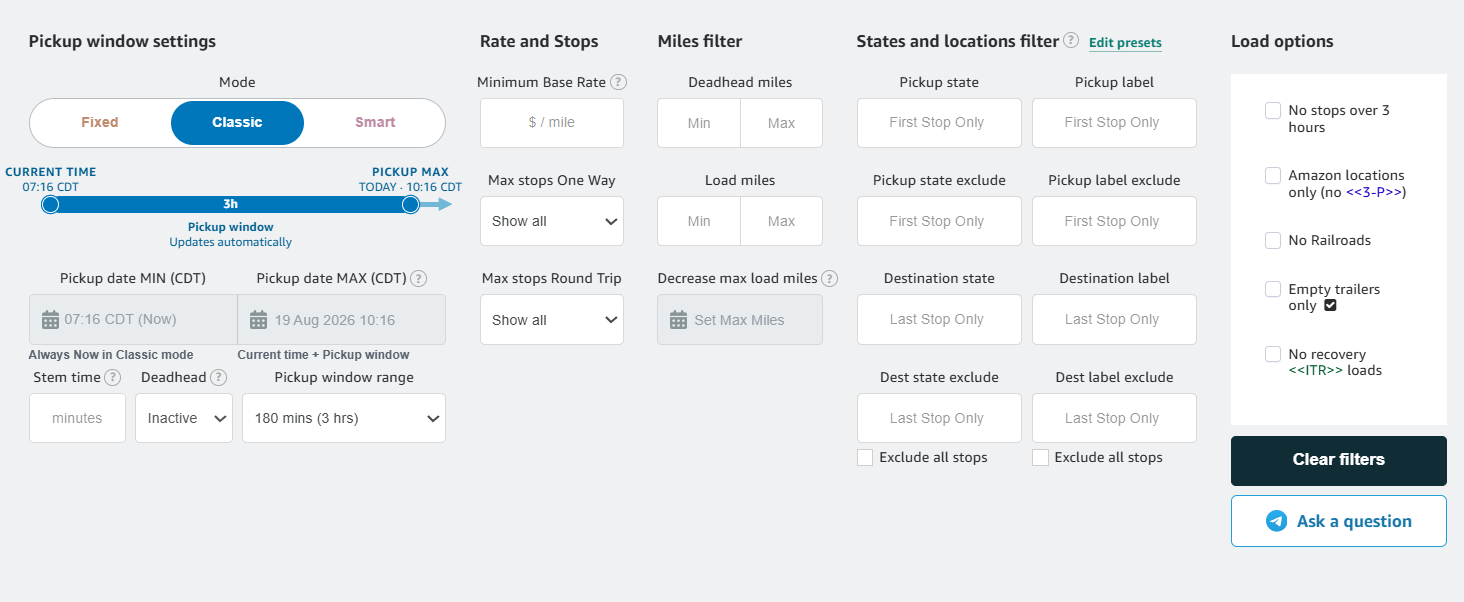
Amazing Relay works inside the Amazon Relay Load Board. It refreshes the saved search already open in the tab, then checks the loads Amazon returns against your enabled payout, mileage, pickup, stop, state, location, and load-type filters. Choose Monitoring for alerts or Autobook only after those requirements match the loads you are willing to accept.

10-day trial for eligible new companies
- Monitor Watch the Load Board
- Match Apply your filters
- Autobook Book a matching load
Feature group 01
Monitor and book
Choose an alert-first workflow or let Autobook act when a load matches.
-
Monitoring
Stop on a matching load, alert the user, and leave booking in their hands.
-
Autobook
Attempt the highest-payout matching load automatically and continue after a missed attempt.
Amazon Relay autobooker guide Monitoring and Autobook Missed Autobook attempts
-
Price monitoring
Watch listed loads for the selected price increase, with optional sound.
-
Demand Chat
Notify when Demand Chat becomes available without changing matching or booking.
-
Fastbook
Add an optional manual one-click booking action to visible load cards.


Feature group 02
Pickup timing
Build a pickup window that stays aligned with the driver and the clock.
-
Pickup window modes
Use Fixed, Classic, or Smart windows depending on whether dates stay fixed or move with time.
-
Pickup readiness
Require enough lead time for preparation and travel to pickup.
-
Flexible pickup
Use later pickup times that Amazon actually offers when the original slot does not qualify.
-
Decrease max load miles
Reduce Load miles MAX automatically as the selected time approaches.

Feature group 03
Advanced Load Board filters
Amazon controls which loads appear in the saved search. Amazing Relay evaluates those returned loads against your payout, mileage, pickup, stop, state, location, and supported special-load requirements.
-
Minimum Base Rate
Show base payout per loaded mile and reject loads below the configured minimum.
-
Hourly coefficient
Compare estimated base payout per working hour and control how deadhead affects it.
-
Distance and stops
Set deadhead/load-mile ranges and separate One Way and Round Trip stop limits.
-
States and locations
Apply include and exclude rules to pickup and destination states or facilities.
-
Exclude intermediate stops
Apply destination exclusions to downstream stops when requested.
-
No long stops
Reject loads containing an intermediate stop longer than three hours.
-
Amazon and railroad locations
Exclude recognized third-party and railroad-terminal loads.
-
Empty trailers
Limit supported one-way results to empty-trailer or container moves.


Feature group 04
Load Board tools
Tune refresh behavior, reuse filters, understand results, and clean up the board.
-
Search status and history
See current-tab and all-tab activity plus recent notifications and outcomes.
-
Load Board cleanup
Remove native suggestions, pop-ups, tabs, ZIP codes, and optional third-party names.
-
Filter explanations
Show which Amazing Relay requirement caused a load to be rejected.


Try every feature for 10 days if eligible
Install Amazing Relay from the Chrome Web Store and start with Monitoring.